Category: Blog

  • MakerDAO-v3—Thoughts

    MakerDAO – Arbitrary To Algo 💡

    High level overview

    MakerDAO’s value proposition is stability. There’s a few key things that effect stability, I believe the primary contributors are:

    • Information – How much does your audience understand about the system they’re participating in? A long-term BTC holder is going to have stronger hands during a 30% drop in price, whereas a newer BTC holder may not be as informed, and thus “weak” hands in situations that may be short-term troublesome.

    The blackswan risk for MakerDAO’s system is not the same if Alice Smith was the only CDP holder compared to Joe Lubin being the only CDP holder.

    • Predictability – Any scenario where there’s volatility, be it in cryptocurrency markets, or sports, or games carrying mixture of skill & chance. The more information that your opponent has in advance, the more they can attempt to predict a certain number of potential strategies that they may be faced with. Like knowing the lineup that will be played for the superbowl team, a coach will use that to mitigate any potential variance.

    • Something else that I’ve forgotten because I had it on a shitty gist.

    🤖Data driven decisions for the following:

    • Debt Ceiling (SCD & MCD).
    • CDP ownership/accessibility.
    • Stability Fee.
    • Dai Savings Rate.
    • Oracles & Pricing.
    • Collater Pool.

    🗳Governance driven decisions for the following:

    • Exchange venues eligible for price discovery.
    • Oracles integrity and transparency.
    • Market maker incentives.
    • Strategy to introduce new asset classes (native on-chain BTC vs tokenized property/securities)
    • Newer assets to be introduced to the the system.

    The further evolved a system becomes, the harder it is to make changes. Early decisions have ongoing effects. Imagine what the ecosystem would look like today if we saw Satoshi create irreversible digital currency and go push it weeks later on gambling and adult forums as a payment method. The shortsighted approach would’nt have given us the foundations we’ve got today. Similarly to MakerDAO being selective in MKR issuance, instead of spraying and praying. Tight foundations are absolutely necessary for a system over the long term.

    Below are a series of calculations that I believe construct a more liquid, more scalable & predictable system. Removing the key variables that challenge the core value prop. Stability.

    Theoretically hitting the reset button on the system. 0 CDP’s open, 0 collateral, 0 collateral pool.

    💸 CDP’s

    • 0 CDP’s available in the system. To generate a CDP, a verifiable on-chain trade must be completed between the collateral and the stable asset. DAI/ETH trade.
    • 1 CDP is able to be generated for every on-chain trade that is verifiable (e.g. a DAI/ETH trade on Uniswap).
    • The person who completed the trade receives an ongoing decaying portion of the stability fee’s paid on that specific CDP, or is paid a portion of the Dai savings rate paid out. Similar to a mortgage broker driving leads to a bank branch.
    • Maker does a trade, system generates a new CDP that’s eligible for use (of which the maker is the owner, but not necessarily the CDP holder) Bank (MakerDAO system) –> Mortgage Broker (the maker, capturing benefits from bringing the collateral to the CDP –> Home buyer (end user looking for leverage on-chain).

    Q: Why would we not have infinite CDP creation?

    A: Remember the scene in the big-short where they found the mortgage brokers who are farming out debt to anyone who will take it. While it’s not an over-collateralized system like MakerDAO, it’s similar in that the introduction of weaker hands or less-educated market participants can bring down the house. CDP accessibility is critical, but it is not critical today, it’s critical long-term. When random bob citizen hears about this crypto thing going up and he buys in, he is more risk to the system than an OG long-term perma bull. To the hodlers reading this, you don’t see blackswan events as bad, you see them as a chance to BTMFD (Buy the dip). Your hands are strong, and provide a stronger base to the system wide risk tolerance. More trades on-chain that are 100% verifiable means a healthier more aggressive trust-minimized price discovery mechanic. The stronger the rate is, the harder it is to enduce slippage relative to the liquidity of the system. So throttling CDP accessibility provides an incentive for on-chain broader distribution of price discovery instead of from a handful of trade teams. Healthier and stronger.

    Q: Why pay ongoing reward for these price-discovery/passive traders?

    A: Two main reasons
    a) System-wide this carries much broader diversification of participation over TWAP over n blocks. Stronger price integrity.
    b) Passive contribution and income to participants in other. While mitigating risk through diversified price-discovery , it’s passive adoption of DAI if they’re being rewarded having not felt like they’ve done anything. In fact, they’ve done something very meaningful, contribute to price discovery. Provides a stronger adoption for businesses/merchants/etc also… Startups like Uniswap for example could be receiving all this as an additional revenue for liquidity providers. As easy as buy some token on an exchange portal or something so passive. Plus all others built on top of those exchanges.

    📈 Debt ceiling

    Current Example
    The debt ceiling is for mitigating risk. Risk exists through poor price discovery relative to how large the system is. So we’re going to compare the miner fees paid on eligible on-chain trades. The proportion of the total block-reward divided by the number of collateral types will help give guidance to the risk levels.

    Debt ceiling is calculated as follows:

    ([Price discovery fees paid per block / Total block reward] x Number of CDP's in the system) / Number of collateral types)
    

    Example

    ([0.00042 / 2.16] x 9607) / 1) = 1.868% 
    
    Debt Ceiling = 1.87% of ETH Total Supply.
    
    Debt Ceiling = 1,972,231.91 ETH


    Note: Current Debt Ceiling is at 2.2M ETH

    Q: How do we increase the debt ceiling then?

    A: To increase the debt ceiling, complete more on-chain trades relevant to the total block reward.

    Q: Oracles just disappear? Surely not?

    A: No, they still are pushing their rates on chain, and they’ll be utilized in the next section.

    🔮 Oracles Role

    Oracles are fundamental parts of the system. Right now, predictability gets effected here. There’s a stronger way to do it IMO.

    The issue that occurs with a select few oracles presently is that:

    1. Largely a “security through obscurity”. Do not reveal who they are, which I understand the motivations. Hard to scale to a multi-trillion Dai float without ironing this out. A fantastic start so far, but thinking further ahead it seems like the biggest vulnerability.

    2. Exchange selection is not verified or transparent. We all know that CMC is garbage, and only certain exchanges carry enough integrity to truly give an accurate price indication. To mitigate this, most trade venues evaluate this counter-party risk by hitting their books and discovering how much slippage there was. The less slippage, the more honest the numbers that are being claimed.

    3. Multi-variant environments. Exchange fee’s on one platform, differ to another, and withdraw limits, regulations, etc… All wrap up into oracle pricing. Which is not entirely inaccurate, it’s just misleading to a larger dataset that is relying on it. For comparison, it’d be like in 2017, the Kimchi premium 33% arbitrage between South Korea ETH price, and the USA ETH price. _Additional context at the bottom for you.

    Q: So what do oracles do then?

    A: They’re piping in the price, from eligible exchanges which have been voted in by MKR holders. E.g. Coinbase, Kraken, Gemini, Bitfinex, Binance, whoever. Messari “Real 10” perhaps? Or whatever. The agreeance should be whether it is top of the orderbook, 100 order, 1000 USD order? Etc…

    🏆 Stability fee

    Relatively straight forward. We’re going to find the gap between the two price feeds. On-chain price discovery of DAI/ETH and compare against USD/ETH price feeds from oracles.

    D*Cp

    D = Delta between on-chain price (as above) vs oracle pricing. Always Dai/collateralType va USD/collateralType.

    Cp = Collateral pool. Could adjust this to a hard collateral ratio which would most naturally be 225%. 225% global pool is 1.5x of the local collateral requirements.

    Current example
    *Note: Negative number implies a fee to be paid (E.g. stability fee). Positive number would imply a reward (Dai savings rate, or similar incentives to compress the ratio to be ~1:1)

    DAI/ETH = 169.854

    USD/ETH = 162.935

    Delta = -4.07%

    Collateral pool = 387.00%

    Result

    Upper (1.5x collateral pool target) = -15.76%

    Lower (2.25x collateral pool target= -9.1654%

    Stability Fee = Range -15.76% <> -9.165%

    Q: What’s the collateral pool got to do with it?

    A: The system is not supposed to be excessively collateralized, it’s supposed to be over-collateralized to a certain point. Beyond that, it becomes dorment and passive participation in the CDP system, which is not efficient and overtime will become largely problematic. I’d suggest dividing collateral pool requirements for CDP’s locally & then MKR systemically.

    The change in PETH (# of the underlying asset) has been within 2% over the month (March 13th – April 13th) where we’ve seen the price of the underlying shift 20%, resulting in the collateral pool ratio growing 305% – 385%.

    CDP’s are 1.5x, 1.5x system wide over collateralized gives the passive CDP participants motivation to get out of their unused CDP, and avoid fees etc… With finite amount of CDP’s, people should be putting the CDP to work and then leaving the system.

    🏘📊Collateral Asset Category

    The whole MakerDAO system is reliant on overcollateralizing to insulate risk. This works if the asset lives on-chain (Digitally native) because we have guarantees for being made whole. Recourse is a dimension of risk. The less certain or predictable it is, the more risk is introduced.

    With multi-collateral Dai I believe that before we choose assets we need to specify categories. Solving problems now, means they can be productized if they scale. Done correctly, it will result in multiple price feeds on-chain, which are the most battle tested and create an opportunity for productizing those feeds.

    First pass at some categories that I see (in order of priority):

    • Digitally native (ETH, REP, REN, ETC, BTC).
      // Cryptographic recourse, 100% verifiable. Smart contract shows me getting paid if x scenario happens.

    • Digital representation of non digital currencies (e.g. Fiatcoins, Digix, etc…).
      // Part cryptographic recourse – Part legal system. Sure the smart contracts are in place, but also I have regulatory bodies I can speak to if I’m not honored my 1:1 redeeming the Fiatcoin from the vendor.

    • Digital representations of assets (Security tokens, property ownership put on chain, etc…
      // Under-developed legal system that’ll take time to get caught up. Resulting in more risk due to more ambiguity in the legal recourse procedures.

    💹 Collateral Asset Selection

    Some earlier thoughts on the premise of predictability of incoming collateral, trends, ceilings and volume. Provides the system the ability to forecast and plan accordingly. Can be found here if interested

    Extra 1: System Calculator (Thrown together) – https://docs.google.com/spreadsheets/d/1Udo_meYUy_knO3urrbBK8X56vnMpYERLhto2WBxpV7A/edit?usp=sharing

    Extra 3: That’s because of additional factors like capital restrictions which means if you get the money into the country, you’re unable to send it back out. Great if you’re offering a remittance service to South Korea, not optimal if you’re trying to find the trade, execute, realize profit, reinvest, rinse/repeat. The capital outflows is your choke point so you aren’t able to realize the arbitrage. Thus the premium stays for far longer than most would expect it to. Comparatively in the real world, USD to China is done as USD to CNH very frequently. Because the on-shore restrictions that exist in China (like South Korean example). So what they do, they typically don’t compare CNH/CNY because it’s largely not apples to apples. They compare USD/CNY to USD/CNH and try use that.

    Visit original content creator repository

  • Assembly-Tic-Tac-Toe

    243-Final-Project

    Instructions

    The game we implemented on CPUlator is Tic-Tac-Toe. It uses the PS/2 Keyboard to get input from the user.

    1. Compile and load the code provided on CPUlator.
    2. Upon loading the code you will see a welcome screen. Press [X] to start the game.
    3. You will now see the game board. This is a 2-player game. At the bottom of the screen is who’s turn it is. Use the number keys to decide which box to place your piece in. For example, if you would like to place X in box 5, press the 5 number key. You can also use [A], [W], [S], and [D] to select boxes (See Note).
    4. Once you have selected your box, press [Enter] to draw. You should now see either an X or O drawn in the box depending on whose play it is.
    5. Keep playing until one person gets 3 consecutive boxes. The game will indicate a winner by drawing a red line over the winning boxes and the status at the bottom will also show there is a winner.
    6. To start a new game, press [Spacebar].
    7. While you are playing the game, you can press [H] to open the help screen. This gives a list of all the keyboard controls the game uses. Press [Escape] to close the help screen and resume your game.

    Additional feature:
    The user can press [C] to make the AI create a move. This will allow players to play against the computer or help players beat their friends with the assistance of the AI.

    Note: The keys for A, W, S, D, and C invoke 2 keyboard interrupts when typed and we think that is something to do with CPUlator itself. When you type either of those keys, the selection box will move quite fast making it difficult to select. We recommend instead of typing these keys, you send a Make signal instead (see the image below). Typing any of the other keys (other than A, W, S, D, and C) in the game work fine.

    Visit original content creator repository

  • Angela

    What is Angela?

    Angela is a PHP worker/microservice framework based on ZeroMQ.

    A typical Angela application consists of a job-server, a client to communicate with the server and workers which do the actual jobs. Angela provides the job server, the client and an API so you can easily implement your worker processes.

                 +--------+
                 | Client |
                 +--------+
                     ^   
                     |   
                     v   
               +------------+
               | Job Server |
               +------------+
         +-------^   ^    ^------+
         |           |           |
         |           |           |
         v           v           v
    +--------+   +--------+   +--------+
    | Worker |   | Worker |   | Worker |
    +--------+   +--------+   +--------+


    Features

    Job server

    The job server is Angelas main process. It manages all your workers, listens for new job-requests, distributes these jobs to your workers and send back responses to the client.
    One server can manage multiple pools of workers and hence handle various types of jobs.

    The job server will fire up worker-processes as defined in your project configuration. It will monitor the workers and for example restart processes if a worker crashes.

    It is also capable of basic load-balancing so jobs will always be passed to the next idle worker.

    Worker

    Angela provides an API to easily build worker processes. Each worker typically does one kind of job (even though in can handle multiple types).
    You would than start multiple pools of worker processes which handle the different kind of jobs required in your application.

    Example

    <?php
    
    class WorkerA extends \Nekudo\Angela\Worker
    {
        public function taskA(string $payload) : string
        {
            // Do some work:
            sleep(1);
    
            // Return a response (needs to be string!):
            return strrev($payload);
        }
    }
    
    // Create new worker and register jobs:
    $worker = new WorkerA;
    $worker->registerJob('taskA', [$worker, 'taskA']);
    $worker->run();

    Client

    The client is a simple class which allows you to send commands or job-requests to the server. It can send commands, normal jobs or background-jobs.

    Normal jobs are blocking as the client will wait for a response. Background jobs however are non-blocking. They will be processed by the server but the client does not wait for a response.

    Example

    <?php
    $client = new \Nekudo\Angela\Client;
    $client->addServer('tcp://127.0.0.1:5551');
    $result = $client->doNormal('taskA', 'some payload'); // result is "daolyap emos"
    $client->close();

    Requirements

    Installation

    Using composer:

    composer require nekudo/angela

    Documentation

    Please see “example” folder for a dummy application. These are the most important files and commands:

    • config.php: Holds all necessary configuration for the server and worker pools.
    • control.php: A simple control-script to start/stop/restart your server and worker processes. Available commands are:
      • php control.php start
      • php control.php stop
      • php control.php restart
      • php control.php status
      • php control.php kill
      • php control.php flush-queue
    • client.php: An example client sending jobs to the job server.
    • worker/*.php: All your worker-scripts handling the actual jobs.

    License

    Released under the terms of the MIT license. See LICENSE file for details.

    Visit original content creator repository

  • GP6_5

    By: GP-6

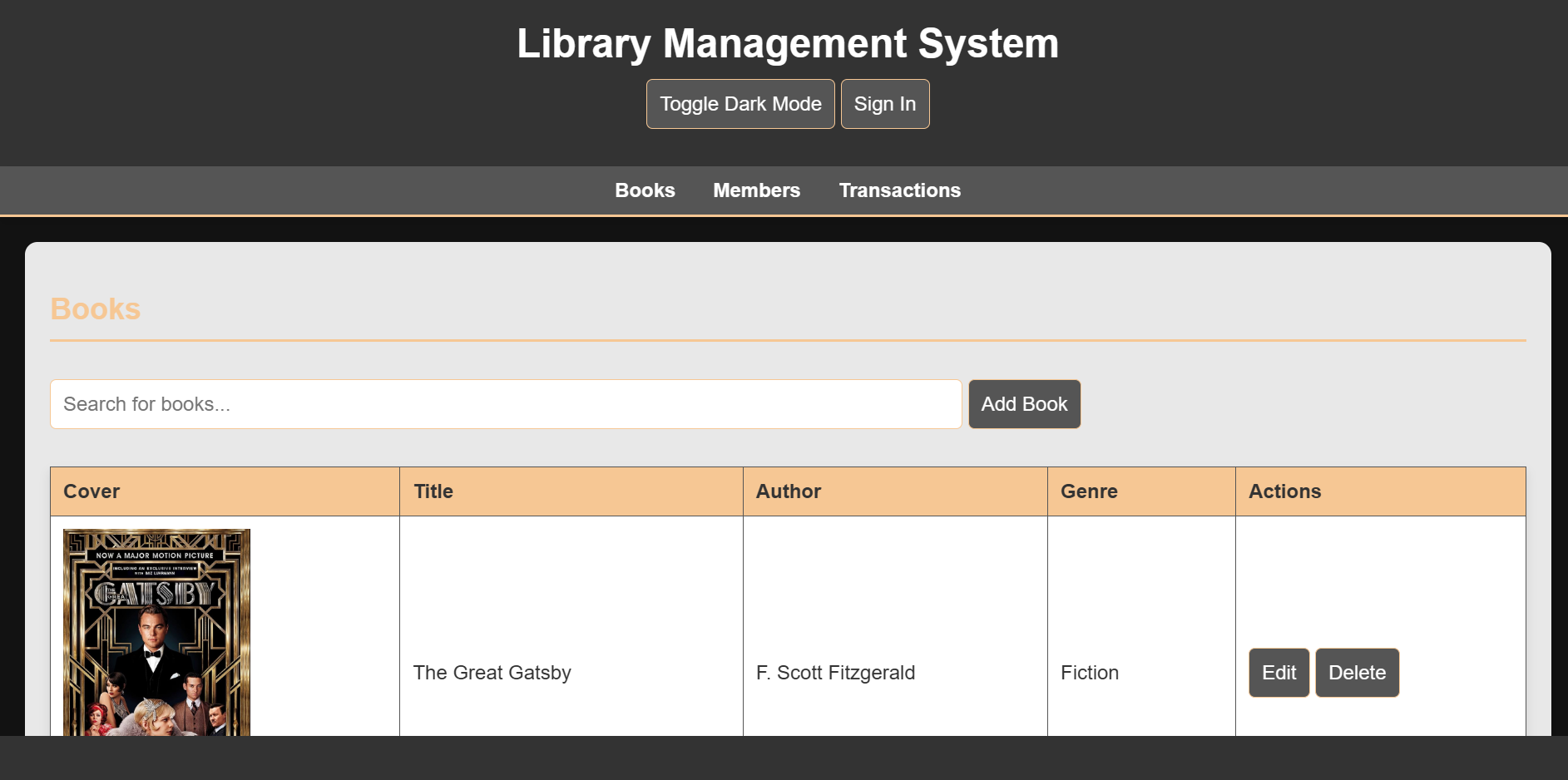
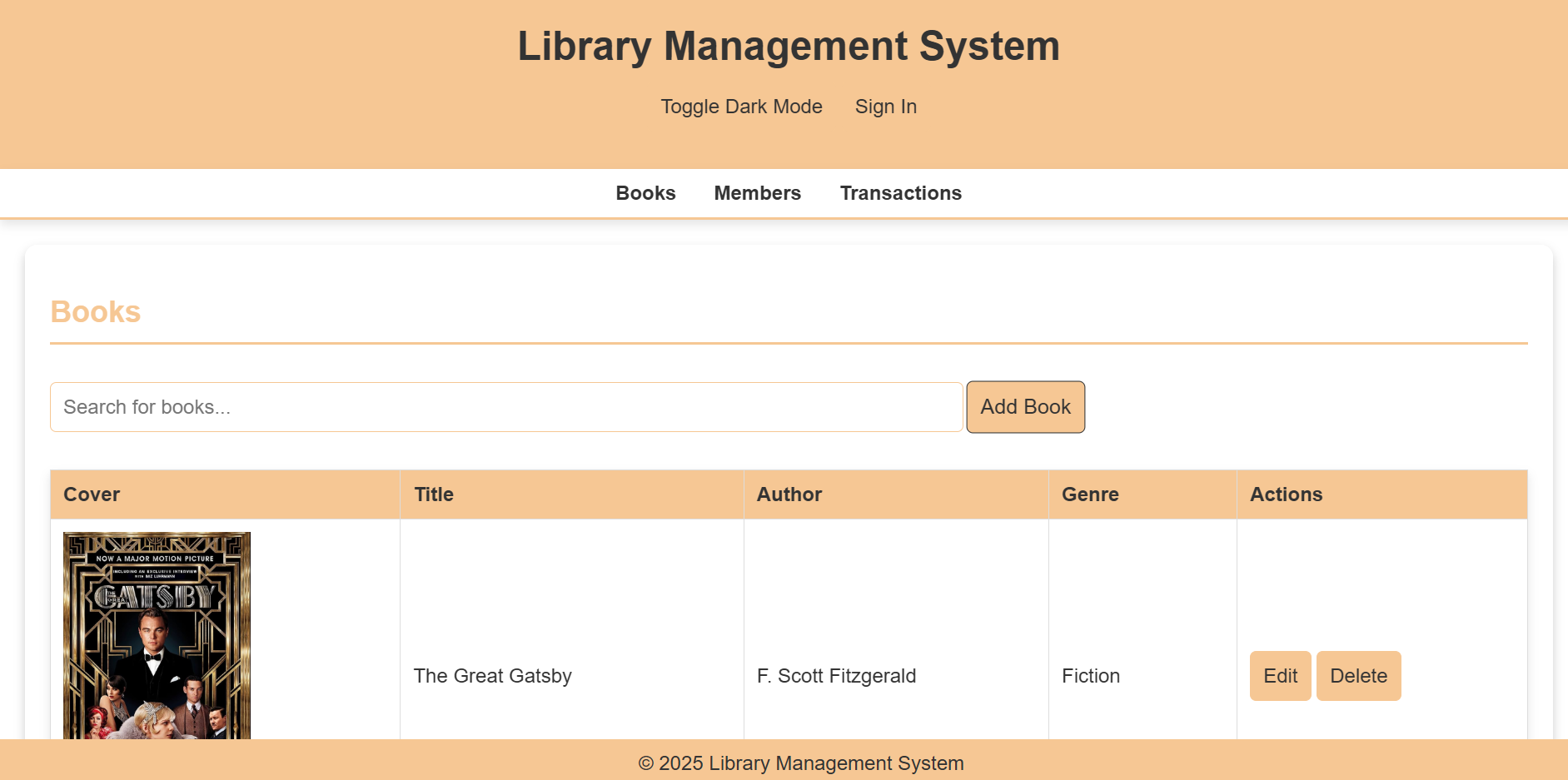
    This repository houses the code for an integrated library management system developed as a group project for our GitHub class.
    The system aims to streamline library operations, providing a user-friendly interface for both librarians and patrons.

    Features

    1. User Interface:

    • Dark Mode: Supports a visually appealing dark mode for comfortable nighttime use.
    • Responsive Design: Adapts seamlessly to various screen sizes, ensuring optimal viewing on desktops, laptops, tablets, and smartphones.

    2. Core Functionality:

    • User Authentication: Secure user login and registration system.

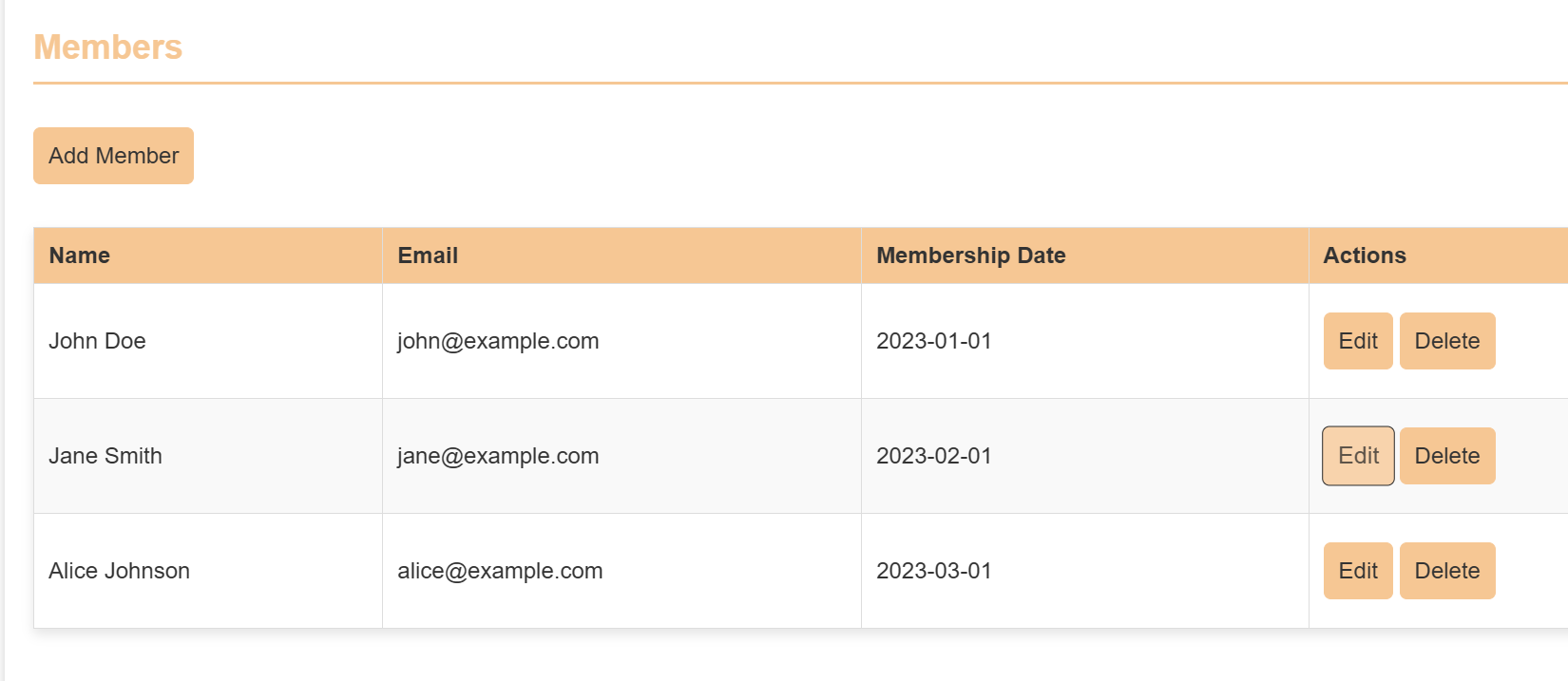
    3. Member Management:

    • Add new members to the library.
    • Edit existing member details (e.g., contact information, membership status).

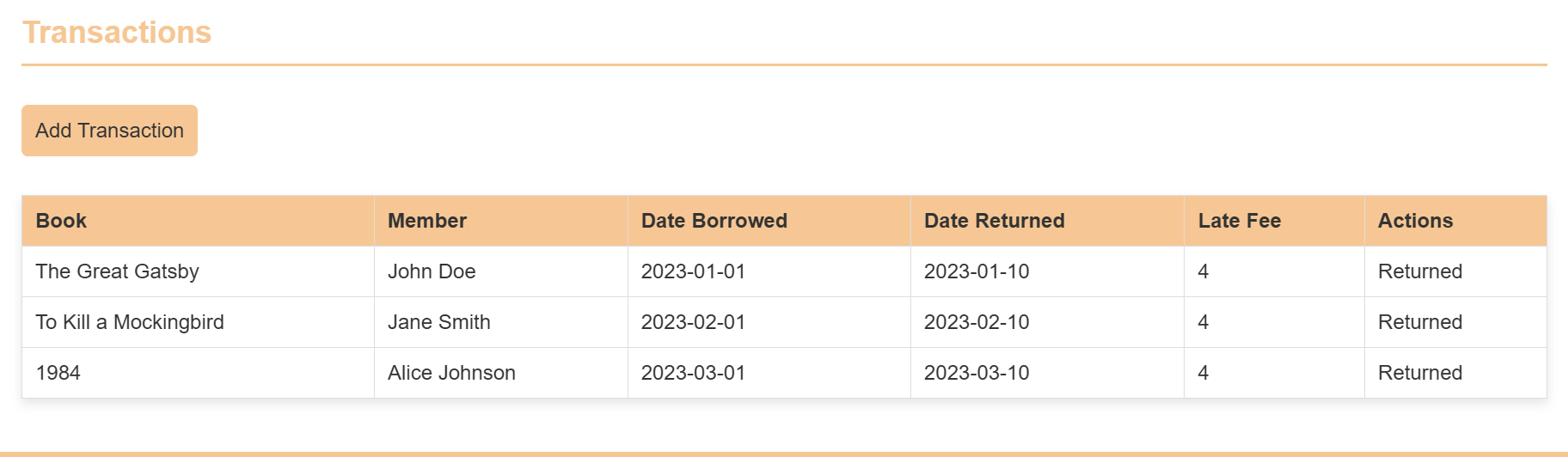
    4. Transaction Management:

    • Record book checkouts, returns, and renewals.
    • Track fines and overdue notices.
    • Edit transaction records as needed.

    5. Book Management:

    • Add new books to the library catalog,
      Including:
    • Book title, author, ISBN, publication year.
    • Detailed descriptions and summaries.
    • Upload book cover images using image URLs.
    • Edit existing book records with updated information.

    Technology:

    • Built with HTML, CSS, and JavaScript for a robust and dynamic user experience.
    • Cross-platform compatibility: Functions effectively across different operating systems and browsers.
    • Hosting: The website is hosted using GitHub Pages.

    Requirements

    1. IDE /Code Editor: VSCode or any other.
    2. Hosting: GitHub Pages.
    3. Live Server Extension: To review the website.
    4. Prettier Extension: To organise the code.
    5. Auto Rename Tag Extension: For fast code access write up.
    6. Gitingest: For making attractive layout of code.
    7. Code Runner Extension: For detection of valid syntax.
    

    Installation/Procedure

    1. Clone the Repository:

    • Clone this repository to your local machine using Git:

    • Bash

        git clone <https://github.com/Haksham/GP6_5>
      

    2. Open in VS Code:

    • Open the cloned repository in VS Code.
    • Install Live Server Extension.
      • Open the VS Code Extensions panel (Ctrl+Shift+X).
      • Search for “Live Server” and install the extension by Ritwick Dey.
      • Start the Live Server.
    • Open the index.html file in the editor.
    • Right-click anywhere within the file and select “Open with Live Server” from the context menu.

    3. Access the Website:

    • The website will open in your default web browser.
    • The URL will be displayed in the VS Code output panel.

    4. Deployment to GitHub Pages

    • Create a gh-pages Branch:
    • Open the terminal in VS Code.
      • Create a new branch named gh-pages:

      • Bash

          git checkout -b gh-pages
        
    • Copy Files to gh-pages Branch:
    • Copy all the necessary files (HTML, CSS, JavaScript, images, etc.) from the main branch to the gh-pages branch.
    • Commit and Push Changes:
      • Commit the changes to the gh-pages branch:

      • Bash

          git add .
          git commit -m "Deploy to GitHub Pages"
          Push the gh-pages branch to the remote repository:
          Bash
        

    5. git push origin gh-pages

    • Configure GitHub Pages:

      • Go to your repository settings on GitHub.
      • Under “GitHub Pages,” select the “gh-pages” branch as the source.
    • Access the Deployed Website:

      • The deployed website will be available at the following URL:

        https://<your_username>.github.io/<repository_name>
        

        Or

    Get the Docker file: DockerFile

    Hosted: GitHub Pages

    Project Structure

    Directory structure:
    └── haksham-gp6_5/
        ├── README.md
        ├── CODE_OF_CONDUCT.md
        ├── CONTRIBUTING.md
        ├── Dockerfile
        ├── LICENSE
        ├── SECURITY.md
        ├── docker-compose.yml
        ├── docker_commands.txt
        ├── index.html
        ├── scripts.js
        ├── styles.css
        ├── .dockerignore
        ├── pics/
        │   ├── coderunner.PNG
        │   ├── dark.PNG
        │   ├── main.PNG
        │   ├── members.PNG
        │   └── transcations.PNG
        └── .github/
            ├── FUNDING.yml
            ├── pull_request_template.md
            └── ISSUE_TEMPLATE/
                ├── bug_report.md
                └── custom.md


    Contributers:

    Member 1:Harshvardhan Mehta
    Member 2:Chandan H K
    Member 3:Deepak B P
    Member 4:Joann Joseph
    Member 5:Mangesh Nesarikar

    Visit original content creator repository
  • netdata-debsecan

    netdata-debsecan

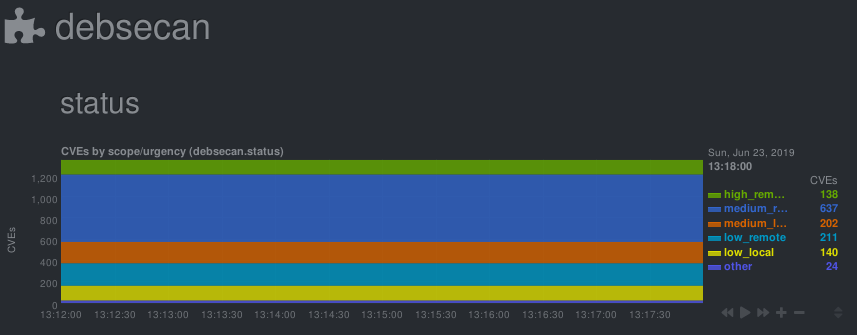
    Check/graph the number CVEs in currently installed packages.

    This is a python.d module for netdata. It parses output from debsecan

    The number of vulnerabilities is graphed by scope (locally/remotely exploitable) and urgency (low/medium/high).

    Installation

    This module expects the output of debsecan, split by scope/urgency in files at /var/log/debsecan. A script to generate the expected reports is provided.

    # install debsecan
    apt install debsecan
    
    # clone the repository
    git clone https://gitlab.com/nodiscc/netdata-debsecan
    
    # install the generation script
    cp netdata-debsecan/usr_local_bin_debsecan-by-type /usr/local/bin/debsecan-by-type
    
    # generate initial debsecan reports in /var/log/debsecan/
    /usr/local/bin/debsecan-by-type
    
    # (optional) configure dpkg to refresh the file after each run
    # generating reports after each apt/dpkg run can take some time
    cp netdata-debsecan/etc_apt_apt.conf.d_99debsecan /etc/apt/apt.conf.d/99debsecan
    
    # add a cron job to refresh the file every hour
    cp netdata-debsecan/etc_cron.d_debsecan /etc/cron.d/debsecan
    
    # install the module/configuration file
    netdata_install_prefix="/opt/netdata" # if netdata is installed from binary/.run script
    netdata_install_prefix="" # if netdata is installed from OS packages
    cp netdata-debsecan/debsecan.chart.py $netdata_install_prefix/usr/libexec/netdata/python.d/
    cp netdata-debsecan/debsecan.conf $netdata_install_prefix/etc/netdata/python.d/
    
    # restart netdata
    systemctl restart netdata
    

    You can also install this module using the nodiscc.xsrv.monitoring ansible role.

    Configuration

    No configuration is required. Common python.d plugin options can be changed in debsecan.conf.

    The default update every value is 600 seconds so the initial chart will only be created after 10 minutes. Change this value if you need more accuracy.

    You can get details on vulnerabilities by reading mail sent by debsecan, or by reading the output of debsecan --format report.

    You can work towards decreasing the count of vulnerabilities by upgrading/patching/removing affected software, or by mitigating them through other means and adding them to debsecan’s whitelist.

    Debug

    To debug this module:

    $ sudo su -s /bin/bash netdata
    $ $netdata_install_prefix/usr/libexec/netdata/plugins.d/python.d.plugin 1  debug trace debsecan

    TODO

    • Document alarm when total number of CVEs changes
    • Document alarm when number of remote/high CVEs is above a threshold
    • Configure debsecan to generate the status file after each APT run (see /etc/debsecan/notify.d/600-mail)

    License

    GNU GPLv3

    Mirrors

    Visit original content creator repository

  • Order-meals-app-in-progress

    🌟 About

    This project is for educational purpose only.
    Project still in progress.

    🎯 Project features/goals

    • Learning CRUD and using localStorage
    • Using useContext, useState, useEffect
    • Using controlled forms
    • Media queries
    • CSS using modules

    Getting Started with Create React App

    This project was bootstrapped with Create React App.

    Available Scripts

    In the project directory, you can run:

    npm start

    Runs the app in the development mode.
    Open http://localhost:3000 to view it in your browser.

    The page will reload when you make changes.
    You may also see any lint errors in the console.

    npm test

    Launches the test runner in the interactive watch mode.
    See the section about running tests for more information.

    npm run build

    Builds the app for production to the build folder.
    It correctly bundles React in production mode and optimizes the build for the best performance.

    The build is minified and the filenames include the hashes.
    Your app is ready to be deployed!

    See the section about deployment for more information.

    npm run eject

    Note: this is a one-way operation. Once you eject, you can’t go back!

    If you aren’t satisfied with the build tool and configuration choices, you can eject at any time. This command will remove the single build dependency from your project.

    Instead, it will copy all the configuration files and the transitive dependencies (webpack, Babel, ESLint, etc) right into your project so you have full control over them. All of the commands except eject will still work, but they will point to the copied scripts so you can tweak them. At this point you’re on your own.

    You don’t have to ever use eject. The curated feature set is suitable for small and middle deployments, and you shouldn’t feel obligated to use this feature. However we understand that this tool wouldn’t be useful if you couldn’t customize it when you are ready for it.

    Learn More

    You can learn more in the Create React App documentation.

    To learn React, check out the React documentation.

    Code Splitting

    This section has moved here: https://facebook.github.io/create-react-app/docs/code-splitting

    Analyzing the Bundle Size

    This section has moved here: https://facebook.github.io/create-react-app/docs/analyzing-the-bundle-size

    Making a Progressive Web App

    This section has moved here: https://facebook.github.io/create-react-app/docs/making-a-progressive-web-app

    Advanced Configuration

    This section has moved here: https://facebook.github.io/create-react-app/docs/advanced-configuration

    Deployment

    This section has moved here: https://facebook.github.io/create-react-app/docs/deployment

    npm run build fails to minify

    This section has moved here: https://facebook.github.io/create-react-app/docs/troubleshooting#npm-run-build-fails-to-minify

    Visit original content creator repository

  • icon-editor

    Icon Bitmapper GUI

    Screenshots

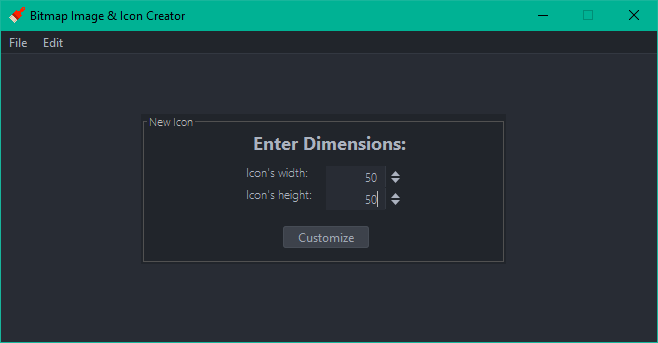
    Dimension Selection

    dimensions

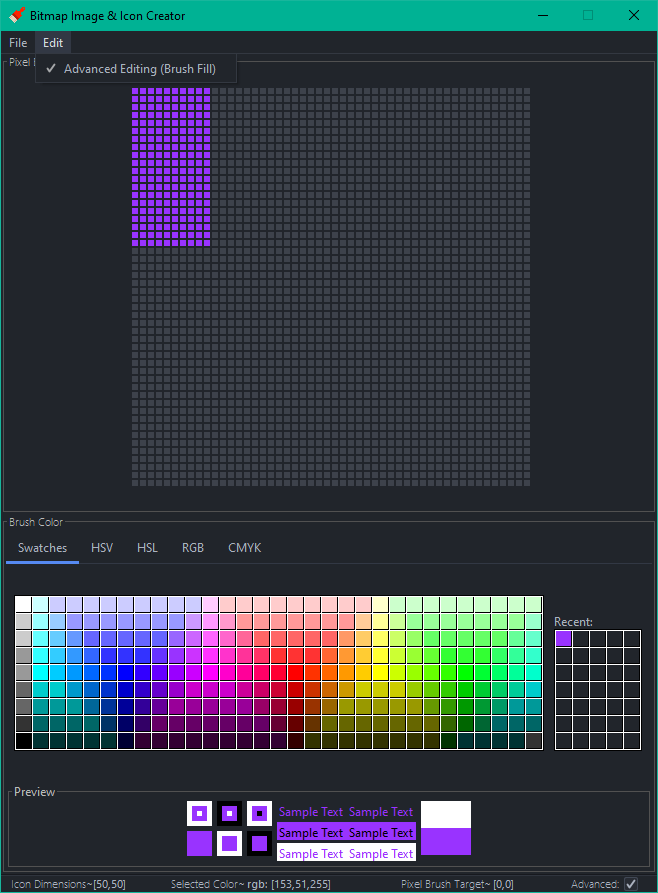
    Main Editor

    editor

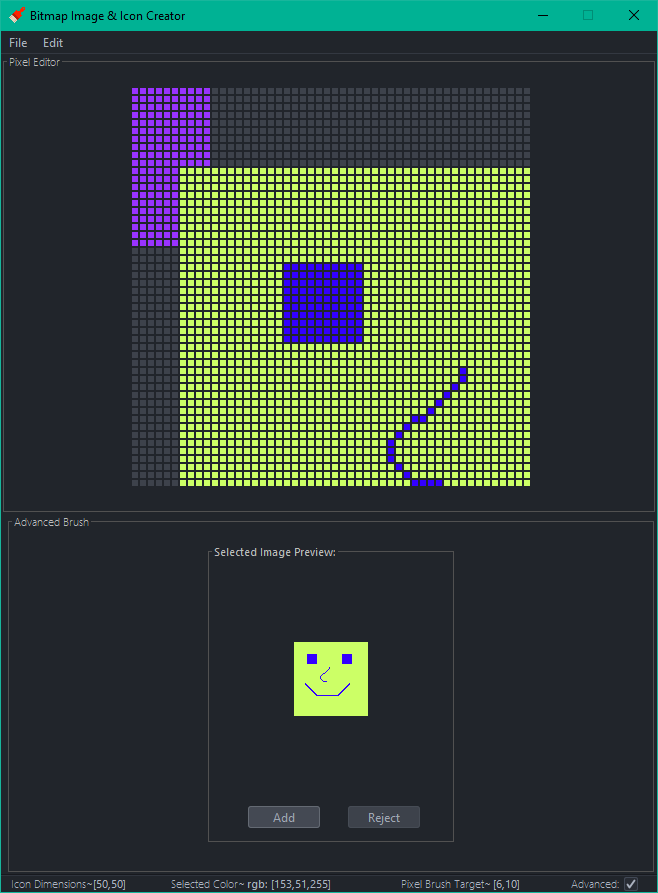
    Advanced Dialog

    advanced

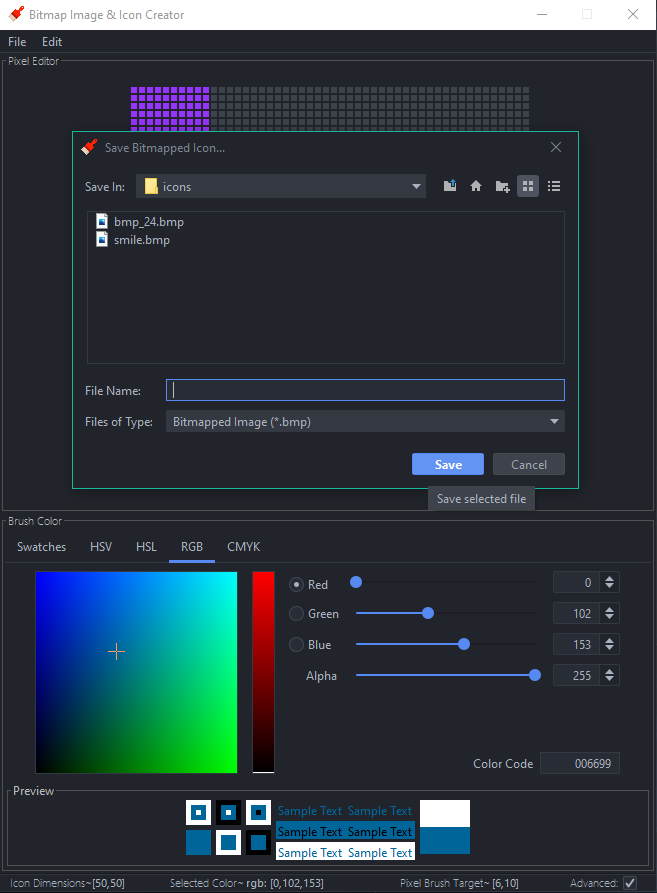
    Saving an Icon to 24-Bit Bitmap

    save

    Folder Structure

    The workspace contains two main folders, where:

    • src: the folder to maintain sources
    • lib: the folder to maintain dependencies

    Features:

    grid- a 2D group of buttons. Click a button and that button will take on a color. The corresponding pixel in the bitmap will get the same RGB value. ✓

    color chooser- allows you to choose a color. Perhaps three sliders would be sufficient to allow you to select a value from 0 – 255 for red, green, and blue. There should be a preview of the selected color every time the sliders change. ✓

    last five colors- show the last five colors used. When someone clicks on a previously used color, adjust the color sliders to take on that color. ✓

    advanced checkbox- when this is checked, a selected button doesn’t take on the color from the color chooser. Instead, it brings up an ‘advanced’ dialog. ✓

    advanced dialog part 1- ask for the number of rows and columns from the clicked button onward to fill with a color. The rows will always be from the selected button and rows beneath and the columns will always be from the selected button and to the right. ✓

    advanced dialog part 2- allow the user to open up any 24-bit bitmap and add the pixels inside the file to your bitmap. The top, left pixel of the selected bitmap will go in the selected button. Always show a preview of the selected file before adding it to the current bitmap. ✓

    create bitmap- clicking this button will show a file chooser to select where the file will be stored. Then allow the user to enter a name and save the bitmap file at that location. ✓

    v1.1.0 Supports observer and decorator patterns for multi-pane editing and input manipulation

    Note, preview features are required for this executable.

    e.g. java --enable-preview -jar .\icon-editor.jar

    Line Drawing: ✓

    The first feature allows the user to draw lines by moving the mouse over the buttons rather than clicking them. This functionality is enabled any time that the shift key is pressed on the keyboard.

    Multiple Windows: ✓

    The second feature allows the user to display multiple bitmap editor windows at the same time.

    When one is changed all of the others will reflect the change more or less instantaneously. In order to accomplish this you will use the Observer pattern. You will now have to capture some data about each edit. For example, you need to know the row and column of the pixel that is being edited along with the color that the pixel will be set to.

    Class EditQueue will be informed about each edit from any of the bitmap editors. This class will be the Subject in the Observer pattern. When one bitmap editor is being edited it will pass information about the most recent edit to the EditQueue and it will notify all of the observers so that they can make the same edit. The bitmap editors will be the Observers and they must react to being notified of an edit.

    Include a way for the user to detach or re-attach a GUI from the Subject.

    GUI Design: ✓

    In each bitmap editor there will be controls to alter an edit received from the EditQueue. An edit can be inverted either vertically or horizontally and each edit’s color may be turned into a shade of gray or a random color. Altering an edit’s data will be accomplished with the Decorator pattern.

    The decorators will be called VerticalInvertBitmapEdit, HorizontalInvertBitmapEdit, RandomColorBitmapEdit, and GrayBitmapEdit.

    When each bitmap editor is notified of a new edit it will check to see if any of the decorators should be applied (using some swing widgets like JCheckBox and JRadioButton). If so, the bitmap editor will be wrapped in a decorator to add the desired functionality. Multiple decorators can be applied to the same edit.

    Decorators: ✓

    VerticalInvertBitmapEdit

    Invert the row number that the edit took place on. If the dimensions of the bitmap being edited are 10 rows and 18 columns and the edit happens on row 3 column 4 then the decorated edit will take place on row 7 column 4 (7 is calculated by taking the height, 10, and subtracting the row number of the edit, 3).

    HorizontalInvertBitmapEdit

    This is similar to the previous decorator except that the column will be updated. For example, in the previous example the new edit will take place on row 3 column 14 (14 is calculated by taking the width, 18, and subtracting the column number of the edit, 4).

    RandomColorBitmapEdit

    This decorator will generate a random color for an edit.

    GrayBitmapEdit

    This decorator will generate a shade of gray for an edit. All shades of gray have identical red, green, and blue values. Take the average of the edit’s red, green, and blue and use the average to create a shade of gray that will be used for the edit.

    Visit original content creator repository
  • accident_risk

    Project description

    It is necessary to create a system that could predict the risk of an accident along the chosen route for a carsharing company, where risk is the probability of an accident with any damage to the vehicle. Once a driver has booked a car, got behind the wheel, and chosen a route, the system must assess the level of risk. If the risk level is high, the driver will see a warning and route recommendations.

    The major task is to understand whether it is possible to predict accidents based on the historical data of one of the regions.

    The customer requires to cover following points:

    1. Create an accident prediction model (target value is at_fault (the culprit) in the parties table)
    • For the model, select the type of culprit – only the car (car).
    • Select cases where the accident resulted in any damage to the vehicle, except for the type of SCRATCH (scratch).
    • For modeling, limit the data for 2012 – they are the most recent.
    • A prerequisite is to take into account the factor of the age of the car.
    1. Based on the model, explore the main factors of the accident.
    2. Understand whether the results of modeling and analysis of the importance of factors will help answer the questions:
    • Is it possible to create an adequate driver risk assessment system when issuing a car?
    • What other factors need to be considered?
    • Does the car need to be equipped with any sensors or a camera?

    Summary

    The best model is the LGBMClassifier, which showed the value of the F1-score at the level of 0.617853 on the validation set with boosting_type=’dart’, learning_rate=0.01 and max_depth=8 hyperparameters, and F1-score of 0.6011 on the test data set.

    However, the model adequately predict the overall risk of an accident only under the assumption that people get into an accident only when they themselves are guilty.

    It seems unrealistic to force customers to build a route on the built-in car-sharing car navigators, then make sure that they do not stray from the intended route.

    Nevertheless, there is a way for model improvement. For example, to integrate customers’ driving data like their driving experience, the presence of an accident in the past, the presence of fines from the traffic police, the fact of registration at a drug dispensary, etc.

    Visit original content creator repository

  • hands-on-great-expectations-with-spark

    Hands-on Great Expectations with Spark

    This is the companion repository related to the article “How to monitor Data Lake health status at scale” published on Towards Data Science tech blog.

    Checkout the project presentation at the Great Expectations Community Meetup.

    In this repository you can find a complete guide to perform Data Quality checks
    over an in-memory Spark dataframe using the python package
    Great Expectations.

    In detail, cloning and browsing the repository will show you how to:

    1. Create a new Expectation Suite over an in-memory Spark dataframe;
    2. Add Custom Expectations to your Expectation Suite;
    3. Edit the Custom Expectations output description and the validation Data Docs;
    4. Generate and update the Data Docs website;
    5. Execute a Validation run over an in-memory Spark dataframe.

    How to navigate the project

    Folder structure:

    • data quality: here is stored the core of the project.

      In this folder you can find:

      • a template to start to develop a new Expectation Suite using Native
        Expectations and Custom Expectations
      • Custom Expectation templates, one for each expectation type: single_column,
        pair_column and multicolumn
      • code to generate (and update) the Great Expectations Data Docs
      • code to run Data Validation
    • expectation_suites: here is stored the
      Expectation Suite generated from the execution of the jupyter notebook.
      The directory, auto-generate by Great Expectation, follows the naming
      convention expectation_suites/dataset_name/suite_name.json.

    • data: here is stored the data used for this hands-on.
      The dataset sample_data.csv was used either to develop the Expectation Suite
      and to run the Data Validation.

    How and where to start

    In the Makefile are listed a set of commands which will help you to browse and
    use this project.

    Expectation suite development with Jupyter Notebook

    Expectation Suites dev env is based on a Jupyter Notebooks instance running in
    a Docker container. The Docker Image used to run the container, is also
    adopted as Remote Python Interpreter with PyCharm Professional to develop
    Custom Expectations with the support of an IDE.

    The development environment run on a Docker container with:

    • Jupyter Notebook
    • Python 3.8
    • Spark 3.1.1

    Before to start: install Docker.

    1. Build the Docker image which contains all that you need to start to develop
      Great Expectation Suites running the command:

      make build
    2. Run Docker container from the previously built image with the command:

      make run
    3. To reach Jupyter Notebook click on the url that you can find on the terminal.

    How to run data validation

    To validate the data (available in the folder data) run the command:

    make validate-data

    This will generate the folders validations/ and site/ which contain
    respectively results of the data quality validation run and the auto-generated
    data documentation.

    How to generate Great Expectations Data Docs

    To locally generate only the Great Expectations data documentation run the
    command:

    make ge-doc

    This will generate site/ folder with the data documentation auto-generated by
    Great Expectations.

    Contributors

    Visit original content creator repository

  • timerush

    TimeRush Game

    TimeRush is an exciting web-based game where you can collect various items, control time, and maximize your earnings. In this README, we provide an overview of the code and functionality of the game.

    Getting Started

    Clone this repository to your local computer and open it in your preferred code editor. To start playing the game, open the index.html file in a web browser.

    git clone https://github.com/your-username/TimeRush.git
    cd TimeRush

    Game Description

    This Markdown document provides an overview of a simple web-based game implemented in JavaScript. The game includes elements such as coins, cards, and items. Players can interact with the game by clicking on items, purchasing cards, and managing their in-game currency.

    Game Setup

    The game is initialized with the following default data:

    Default Game Card Data

    • Uncommon Cards (★)

      • Adds an item with a large amount of time (Price: 32)
      • Adds an item with a large number of coins (Price: 32)
    • Rare Cards (★★)

      • Increases maximum time over 60 (Price: 64)
      • Increases the probability of finding a coin (Price: 64)
    • Epic Cards (★★★)

      • Adds an item with a random effect (Price: 128)
      • Gives a critical hit chance for each item (Price: 128)
    • Legendary Cards (★★★★)

      • Increases maximum number of airdrops (Price: 256)

    Default Game Items Data

    • Common Items

      • “+1” (Coin: +1)
      • “+2” (Coin: +2)
      • “T+1” (Time: +10)
    • Uncommon Item

      • “+4” (Coin: +4)
    • Special Item

      • “T-1” (Time: -10)
      • “T+2” (Time: +20)
      • “�” (Special Effect)

    Game Elements

    Coin

    Players collect coins throughout the game. The initial coin balance is 0.

    Cards

    Players can purchase cards from the market. Cards are categorized as uncommon (★), rare (★★), epic (★★★), and legendary (★★★★). Each card has a specific price and effect. For example, rare cards can increase the maximum time or the probability of finding a coin.

    Items

    Items appear in the game field, and players can click on them to gain benefits. Items have different effects, such as increasing coins or time. Some items have special effects, and there is a chance for critical hits.

    Game Mechanics

    • Players start with no coins.
    • Players can click the “Start” button to begin the game.
    • Items appear in the game field, and players can click on them to gain rewards.
    • Players can purchase cards from the market using their coins.
    • Cards have various effects that enhance the gameplay.
    • The game ends when the timer reaches zero.

    Game Logic

    The game logic is implemented in JavaScript. It handles item interactions, card purchases, and game mechanics. The game includes a timer, critical hit mechanics, and the ability to purchase cards from the market.

    The game also stores player progress, including the coin balance and purchased cards, in local storage to allow for continued play.

    This Markdown document provides an overview of the game setup, elements, and mechanics. The actual implementation details and code can be found in the accompanying JavaScript file.

    Unlocking the Power of Blockchain

    In TimeRush Game, players can collect various items, manipulate time, and maximize their profits. What sets this game apart is the ability for players to create and develop tokens within a blockchain ecosystem. Dive into the world of TimeRush and experience the thrill of both gaming and blockchain innovation.

    Visit original content creator repository